A world computer in your pocket.
The local node for Ethereum browsing.
Open .eth and .wei sites with local verification, trusted HTTPS, and built-in IPFS—no gateways, no middlemen.
Download NeoMist v0.5.0
Get Started
- Download, install, and launch NeoMist
- Restart your browser
- Open https://vitalik.eth
Why NeoMist
Without NeoMist, browsing Ethereum sites means:
- trusting centralized gateways (which can change, censor, or get hacked)
- dealing with broken HTTPS warnings or unfamiliar URLs
- downloading multiple tools just to open a site
NeoMist fixes this.
You get direct, local access to ENS websites that feels like using the normal web.
What You Get
Open
.ethand.weisites like normal websites
No gateways, no special URLsVerify content locally
Resolve ENS contenthash records using Ethereum data on your machineReal HTTPS for decentralized sites
No warnings, no hacksBuilt-in IPFS access
Faster, private, and gateway-freeLocal dashboard
Manage everything athttps://neomist.localhost
Trust Model
With NeoMist:
- You trust your own machine
- You verify ENS data using a local Ethereum light client
- You fetch content directly from IPFS
No gateway. No hosted resolver. No middle layer.
How It Works
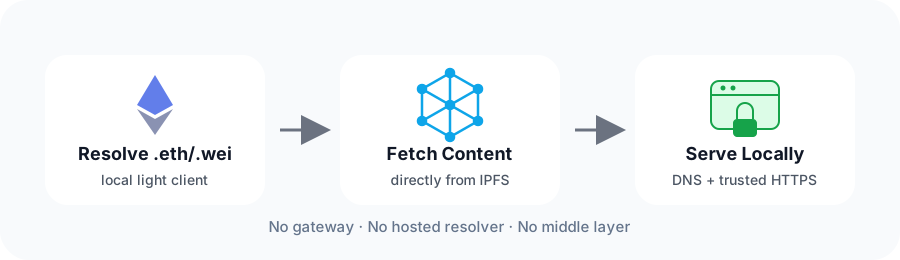
- Resolve .eth and .wei names using a local Ethereum light client
- Fetch site content from IPFS
- Serve it locally over DNS + trusted HTTPS
NeoMist takes care of all these steps for you. No need to download any additional software.
Built for Local Control
- Runs entirely on your machine
- No remote services required
Open & community-driven:
Follow development, report issues, or join the discussion.